
Ask a team what they would automate first and they will name the task they dread: the month-end close, the quarterly report, the two-hour job that ruins a Friday. It is rarely the right answer. The work that costs the most is usually something small that nobody complains about, because it only takes ten minutes — forty times a week.
This is the method we use to choose a first automation. It needs a spreadsheet, a stopwatch and about an afternoon per team, and it replaces the argument about priorities with four numbers per task.
Why the task everyone names is usually the wrong one
People remember duration and forget frequency. A two-hour task is an event; a ten-minute task is background. But the cost is the product of the two, and frequency varies far more than duration does. A job done once a month would have to take most of a working week to compete with one done several times a day.
Take two tasks of the kind most finance teams will recognise. Rebuilding the monthly management report takes two hours, once a month: about half an hour a week. Matching incoming supplier invoices to purchase orders takes ten minutes, forty times a week: nearly seven hours a week. The report is the one that comes up in every meeting. The invoices cost around fourteen times as much.
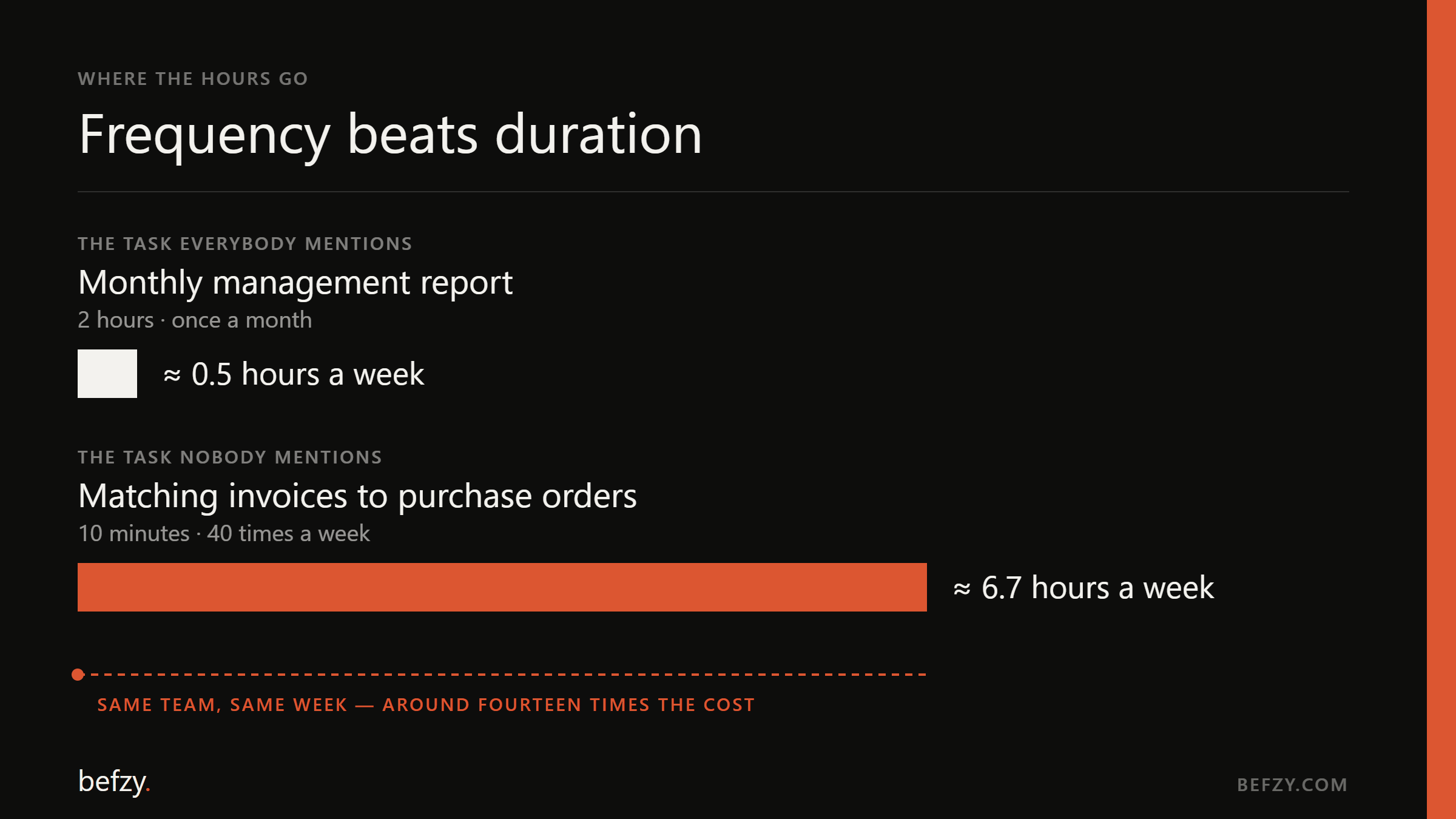
There is a second reason to prefer the frequent task. Something that runs forty times a week produces forty test cases a week. You find out within days whether the automation works and what the awkward cases look like. A monthly job gives you twelve chances a year to learn anything.
Four numbers per task
For every recurring task, write down four things. None of them needs to be precise. They need to be honest.
- 01
Frequency — runs per week
Count from the system, not from memory: tickets closed, invoices booked, messages in the shared inbox. People underestimate how often they do small things, usually by a wide margin.
- 02
Handling time — minutes of attention per run
Time five real runs with a stopwatch. Measure the minutes someone is actually working on it, not how long it sits in a queue. Waiting time matters to your customers, but it is not what the hours are being spent on.
- 03
Rule stability — how much of it follows the rule
Ask the person who does the task to explain the rule. If they can do it in two minutes and it covers nine cases in ten, the task is stable. If every case starts with "it depends", it is judgement rather than process, and it belongs lower on the list.
- 04
Cost of an error — and how fast it is noticed
A wrong figure on an internal dashboard is caught on Monday and costs nothing. A wrong payment run is caught by a supplier and costs a relationship. The more an error costs and the later it surfaces, the more of the task should stay with a person.
Frequency times handling time gives hours per week. That is the size of the prize. Stability and error cost tell you how much of it you can actually take, and how carefully.
How to run the audit in an afternoon
- 01
List what recurs
Take one team and two ordinary weeks. Write down every task that happened more than once. The list is usually longer than anyone expects, and the lines nobody thinks of as tasks — forwarding, renaming, copying a number from one screen to another — are the ones you are looking for.
- 02
Put a count and a time on each
Counts from the systems, times from a stopwatch. Guessing is fine for anything under an hour a week; it will not reach the top of the list either way.
- 03
Sort by hours per week
Most of the total sits in the top handful of lines. Everything below them can wait, however irritating it is.
- 04
Mark stability and error cost on the top ten
Three levels are enough for each: stable, mostly stable, judgement — and cheap to get wrong, expensive, unacceptable.
- 05
Check what the task touches
Which systems, and can they be read from and written to? A task that sits between two tools with proper interfaces is cheap to automate. One that lives in a desktop application with no interface is still possible, but it moves down the list.
Reading the result
Put the top ten on two axes — hours per week, and how stable the rules are — and four groups appear.
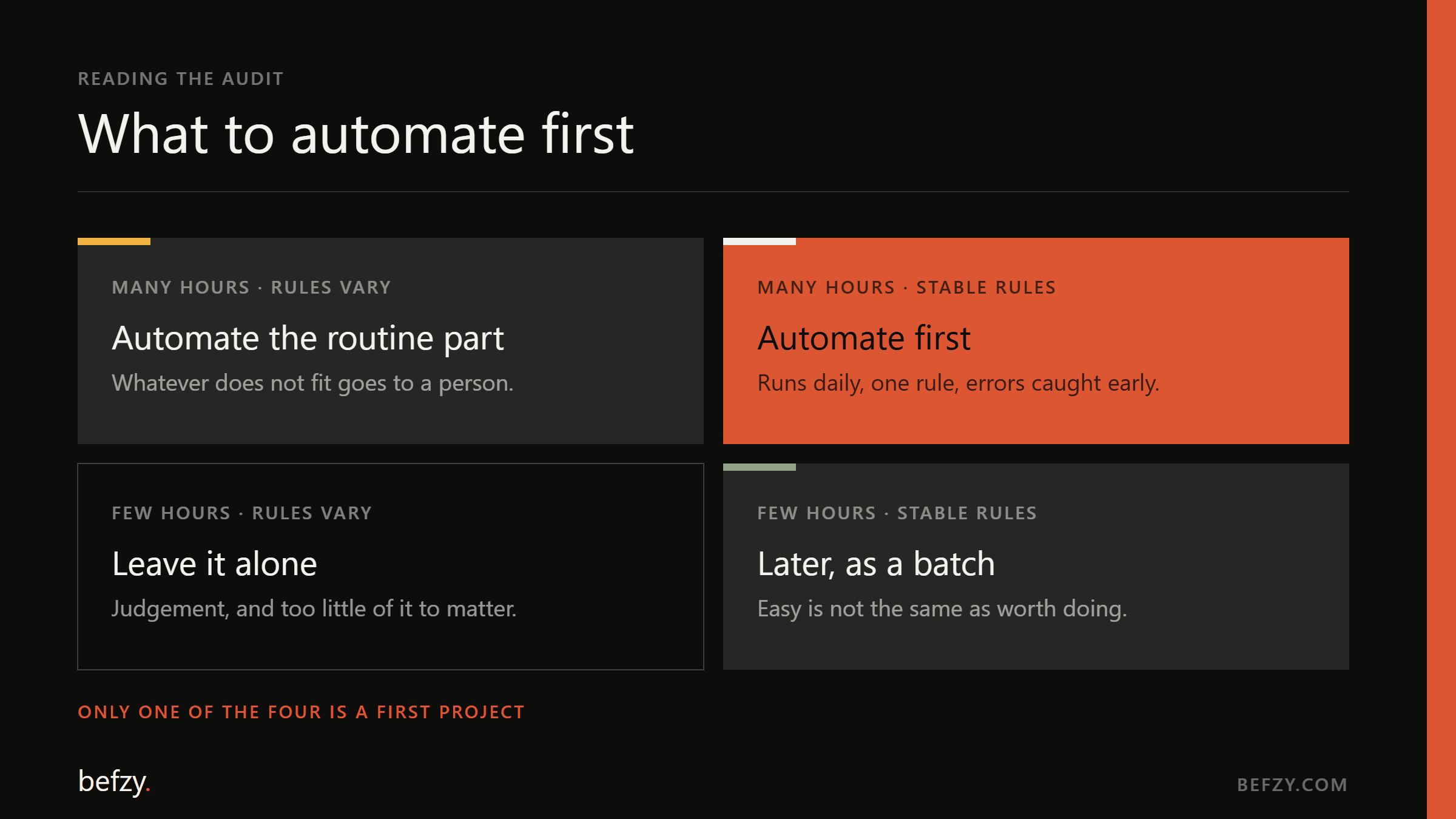
- Many hours, stable rules: automate first. This is where a first project pays for itself.
- Many hours, rules that vary: automate the routine part and route the rest to a person. Most of the valuable work ends up here.
- Few hours, stable rules: later, as a batch. It is easy, which is not the same as worth doing.
- Few hours, rules that vary: leave it alone.
The two tempting mistakes are starting with something from the third group because it is easy, and starting with the hardest task in the second because it is impressive. The first proves nothing anyone cares about. The second takes months to show a result, and a first project needs to show one in weeks.
What should move a task down the list
- The rule changes every few weeks. You would be maintaining the automation more often than it saves time.
- The process itself is broken. Automating a bad process makes it fast, not good. Fix the steps first — that is often most of the saving.
- Nobody owns it. An automation without a named owner on your side is abandoned the first time it needs a decision.
- The inputs arrive in a new shape every time. That is a job for a model with a review step rather than a rule, which is a different project with a different budget.
- An error would be both unacceptable and invisible. Keep the person, and automate the preparation around them.
Start with the handoff, not the happy path
Whatever you choose, some share of cases will not fit the rule. Those cases are where automation projects fail — not because there are many of them, but because nobody decided what happens to them. Design that route first: where the odd case goes, who sees it, and what they are shown. Then automate the volume around it.
This also settles the question of trust. A team will accept an automation that says "I am not sure about this one" on day one. They will not forgive one that guessed.
Agree the baseline before you build
The audit leaves you with something more useful than a priority list: a baseline. Hours per week for this task, measured before anything changed. Write it down and agree it with the people who do the work. Once the automation is live, measure the same thing the same way.
If the number has not moved by the second week, that is when you want to know — while the fix is a small change rather than a post-mortem.
“Frequency beats duration, almost always. The ten-minute task done forty times a week costs more than the two-hour job everyone complains about.”
Questions this raises
- Do we need AI for this, or is ordinary automation enough?
- Often ordinary automation is enough. If the inputs are structured and the rule is fixed — a scheduled job, an integration between two systems — no model is needed, and the result is cheaper and more predictable. AI earns its place when the inputs are unstructured: emails, PDFs and free text that have to be read before any rule can be applied.
- How many processes should we automate at once?
- One. A single task that is live and measured teaches you more about your own systems and exceptions than a roadmap of ten. The second automation is usually quicker, because the connections to your systems already exist.
- How do we work out whether an automation pays for itself?
- Hours saved per week, multiplied by what an hour of that team costs you, set against the cost to build and to run it. Use the measured baseline rather than an estimate, and count only the hours that are actually released — a task cut from ten minutes to two still needs the two.
- What if the task changes every few months?
- Then build it as small, named steps so a rule change means editing one step, and keep it lower on the list than a task with the same hours and a stable rule. A changing rule is a running cost, and it belongs in the calculation.
Related services
Next note
The EU AI Act in practice: a compliance checklist for businesses that use AI
Most of what the Regulation asks for is engineering, not legal work. Here is the checklist we run before any AI system we build goes live — and the reason each item is cheap now and expensive later.